
 โดย Marcus Reeve
สร้างระบบเทรดคริปโตอัตโนมัติตลอดเวลาด้วยเอเจนต์ AI สี่ตัว
หากคุณเคยอยากได้ระบบเทรดคริปโทที่ไม่เคยหลับ ไม่เคยตื่นตระหนก และไม่เคยลืมดูกราฟตอนตีสาม สิ่งที่คุณอยากได้จริง ๆ ก็คือ บอตเทรดคริปโทด้วย AI ปัญหาของ "บอต" ส่วนใหญ่คือมันไม่ได้ฉลาดเลย—มันเป็นแค่สคริปต์แข็งทื่อที่กดปุ่มกฎเดิม ๆ ไม่ว่าตลาดจะสงบหรือลุกเป็นไฟ SimianX ออโตไพลอต นั้นต่างออกไป: มันคือระบบ 24/7 ที่ทีมเอเจนต์ AI วิเคราะห์ตลาดอย่างต่อเนื่อง ชั่งน้ำหนักสัญญาณ ตัดสินว่าการเทรดนั้นคุ้มค่าจะเข้าหรือไม่ บริหารสถานะด้วยตรรกะ Stop-Loss และ Take-Profit และแจ้งเตือนคุณในทุกความเคลื่อนไหว คู่มือนี้จะอธิบายอย่างชัดเจนว่าจะรันมันอย่างไร เบื้องหลังเกิดอะไรขึ้น และจะควบคุมความเสี่ยงได้อย่างไร
บอตเทรดคริปโทด้วย AI แบบ 24/7 ทำอะไรกันแน่
บอตคริปโทแบบดั้งเดิมจะรันกลยุทธ์ตายตัว: "ซื้อเมื่อเส้นค่าเฉลี่ยเคลื่อนที่ 50 คาบตัดขึ้นเหนือเส้น 200 คาบ" ซึ่งใช้ได้จนกว่าสภาวะตลาดจะเปลี่ยน แล้วมันก็ยังเทรดไอเดียที่พังเดิม ๆ ซ้ำไปเรื่อย ๆ ส่วน Autopilot ด้วย AI จะแทนที่กฎตายตัวด้วยการให้เหตุผลอย่างต่อเนื่อง บน SimianX นั้น Autopilot ทำงาน ตลอดยี่สิบสี่ชั่วโมง กับคู่เทรดเพียงคู่เดียว—สมมติว่า Bitcoin เทียบกับ USDT—และตั้งคำถามสี่ข้อซ้ำ ๆ ว่า ปัจจัยทางเทคนิคบอกอะไร? ข่าวสารและอารมณ์ตลาดบอกอะไร? ปัจจัยพื้นฐานบอกอะไร? และเมื่อรวมทั้งหมดแล้ว ตอนนี้เราควรลงมือทำอะไรจริง ๆ หรือไม่?
คำถามสุดท้ายนั้นสำคัญกว่าที่คนส่วนใหญ่คิด สิ่งที่มีค่าที่สุดที่ Autopilot ด้วย AI ทำได้คือการปฏิเสธที่จะเทรด ตลาดใช้เวลาส่วนใหญ่อยู่ในความสับสน และระบบที่ลงมือเฉพาะเมื่อมีรูปแบบที่มั่นใจสูงเท่านั้นจะอยู่รอดได้นานกว่าระบบที่ฝืนเปิดสถานะทุกชั่วโมง Autopilot ของ SimianX ถูกสร้างขึ้นรอบวินัยข้อนี้พอดี และในช่วงท้ายของคู่มือนี้คุณจะเห็นตัวอย่างจริงที่มันปฏิเสธการเทรด
เพื่อให้ชัดเจนว่า "Autopilot" ในที่นี้หมายถึงอะไร: ระบบทำการวิเคราะห์ด้วย AI อย่างต่อเนื่อง และบริหาร สถานะที่ควบคุมโดย AI เพื่อการติดตามผลงาน โดยส่งเหตุผลทั้งหมดเบื้องหลังทุกการตัดสินใจให้คุณ เพื่อให้คุณยังคงเป็นผู้กุมบังเหียน มันคือชั้นของความฉลาดและการทำงานอัตโนมัติ ไม่ใช่กล่องดำที่แอบดูดเงินในกระเป๋าคุณ คุณเห็นเหตุผลเสมอ และหยุดมันได้ด้วยคลิกเดียว
วิธีปรับใช้ Autopilot ในสามขั้นตอน
การปรับใช้ใช้เวลาราวหนึ่งนาที ที่ หน้า Autopilots ให้คลิก Deploy New Autopilot แล้วตัวช่วยตั้งค่าจะเปิดขึ้น
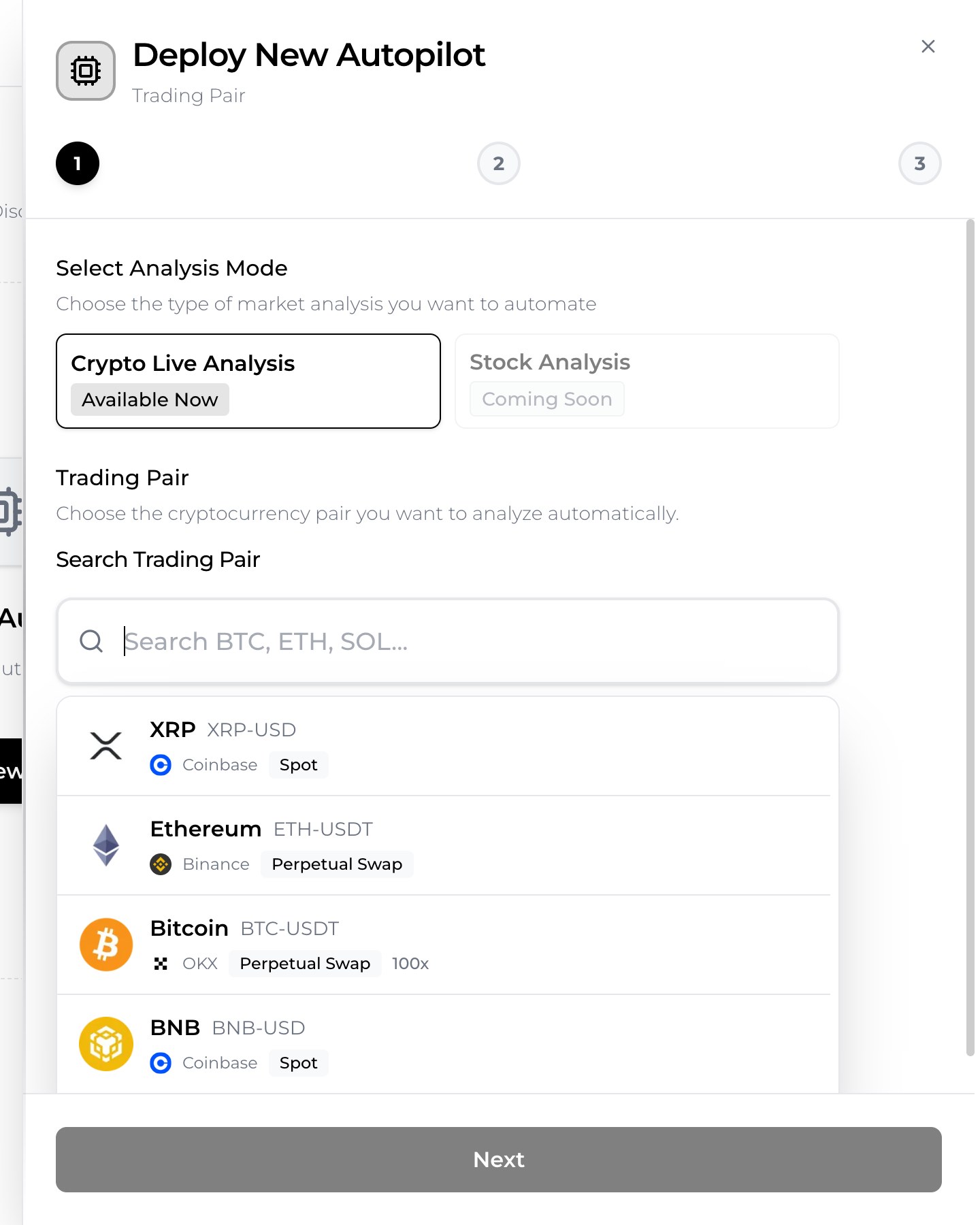
ขั้นที่ 1—เลือกตลาด เลือก Crypto Live Analysis (การวิเคราะห์หุ้นอยู่ในแผนงาน) จากนั้นค้นหาคู่เทรด ตัวเลือกครอบคลุมกระดานเทรดหลัก—OKX, Bybit, Binance และ Coinbase—และรวมทั้งคู่สปอตและสัญญาซื้อขายล่วงหน้าถาวร (perpetual swap) ที่มีเลเวอเรจสูงสุด 100× พิมพ์ "BTC" แล้วคุณจะเห็นทุกอย่าง ตั้งแต่ BTC/USDT สปอตไปจนถึง BTC perpetual โดยแต่ละรายการมีป้ายกำกับกระดานเทรดของมัน
ขั้นที่ 2—ตั้งค่ากลยุทธ์และทำความรู้จักเอเจนต์ทั้งสี่
ขั้นที่สองคือจุดที่ Autopilot เลิกเป็นของเล่น ก่อนอื่นคุณกำหนด กรอบเวลา—1 นาที, 5 นาที, 15 นาที, 1 ชั่วโมง, 4 ชั่วโมง หรือ 1 วัน—ซึ่งบอกเอเจนต์ว่าควรให้เหตุผลที่ความละเอียดของแท่งเทียนระดับใด การตั้งค่าแบบ scalping ใช้ 1M–15M ส่วนการตั้งค่าแบบ swing ใช้ 1H–1D
ถัดไปคุณจะเห็น AI Position Control ซึ่งเปิดใช้งานเป็นค่าเริ่มต้น นี่คือสิ่งที่ทำให้ระบบเปิด ปรับ และปิดสถานะที่ควบคุมโดย AI ได้โดยอัตโนมัติตามการตัดสินใจที่ได้ แทนที่จะแค่แสดงสัญญาณแล้วรอคุณ คุณสามารถติดตามทุกเหตุการณ์ของสถานะได้แบบเรียลไทม์และในกล่องจดหมายของคุณ
พลังที่แท้จริงอยู่ใน Advanced Settings ที่ซึ่งสมองของ Autopilot ถูกเปิดเผยเป็นเอเจนต์เฉพาะทางสี่ตัว แต่ละตัวมีหน้าที่ของตัวเอง โมเดล AI ที่เลือกได้เอง และช่วงเวลาวิเคราะห์ของตัวเอง
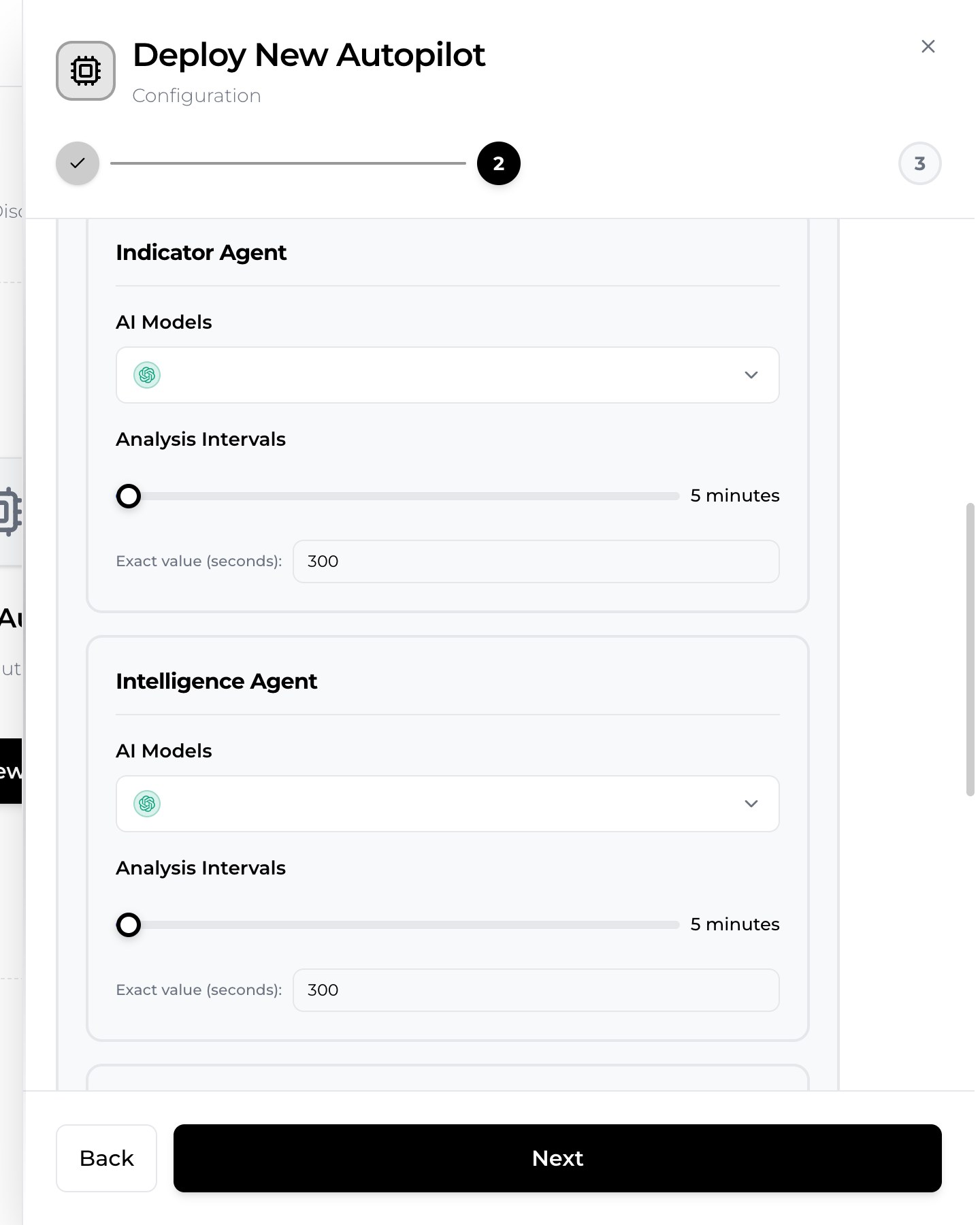
- Indicator Agent—นักเทคนิค อ่านการเคลื่อนไหวของราคาและตัวชี้วัดคลาสสิกอย่าง RSI และ MACD ให้การอ่านทิศทางอย่างรวดเร็ว (ขาขึ้น ขาลง หรือเป็นกลาง) พร้อมคะแนนความแข็งแกร่งและคุณภาพ มันทำงานบ่อยเพราะปัจจัยทางเทคนิคเคลื่อนไหวเร็ว
- Intelligence Agent—โต๊ะข่าว รับข่าวกรองตลาดจากฟีดข่าว RSS และเหตุการณ์ตลาดทำนายผล ให้คะแนนอารมณ์ตลาด และชี้ตัวกระตุ้นที่กราฟมองไม่เห็น
- Fundamental Agent—นักวิเคราะห์ระยะยาว สร้างมุมมองสินทรัพย์ที่ช้ากว่าและครอบคลุมกว่า—โครงสร้างแนวโน้ม พลวัตอุปทาน แนวรับและแนวต้าน—ซึ่งยังใช้ได้นานเป็นชั่วโมงแทนที่จะเป็นวินาที
- Decision Agent—ผู้จัดการพอร์ต หลอมรวมสัญญาณย่อยทั้งสามเป็นคะแนนถ่วงน้ำหนักเดียว และให้การตัดสินใจขั้นสุดท้าย: NO TRADE, LONG หรือ SHORT พร้อมความมั่นใจ ระดับความเสี่ยง จุดเข้า Stop-Loss และ Take-Profit
แต่ละเอเจนต์มีแถบเลื่อน Analysis Intervals ที่วัดเป็นวินาที (ค่าเริ่มต้นคือ 300 คือห้านาที) ดังนั้นคุณจึงให้นักเทคนิคตอบสนองเร็วได้ในขณะที่ปล่อยให้มุมมองพื้นฐานรีเฟรชในจังหวะที่ยาวกว่า การแบ่งหน้าที่นี้คือสิ่งที่ทำให้ผลลัพธ์รู้สึกเหมือนทีมวิจัยมากกว่าโมเดลเดี่ยวที่มั่นใจเกินเหตุ
การเลือกโมเดล AI ที่ต่างกันสำหรับแต่ละเอเจนต์
นี่คือฟีเจอร์ที่ทำให้ SimianX โดดเด่นจริง ๆ: คุณสามารถกำหนด โมเดลภาษาที่ต่างกันให้แต่ละเอเจนต์ อยากให้ Grok รันปัจจัยพื้นฐานและ Gemini เป็นผู้ตัดสินขั้นสุดท้ายไหม? จัดให้ เมนูโมเดลดึงมาจากรายชื่อผู้ให้บริการชุดเดียวกับที่ติดตามใน กระดานจัดอันดับเทรดคริปโทด้วย AI—Grok, OpenAI (GPT), Google (Gemini), DeepSeek, Qwen และ Anthropic (Claude)—ดังนั้นคุณจึงจับคู่อัตราชนะที่วัดได้ของโมเดลกับงานที่คุณมอบให้มันได้
นี่ไม่ใช่ลูกเล่น โมเดลต่างกันมีจุดแข็งต่างกัน บางตัวเฉียบคมกว่าในการแยกแยะข่าวที่มีสัญญาณรบกวน บางตัวเก่งกว่าในการให้เหตุผลเชิงตัวเลขอย่างมีวินัย กระดานจัดอันดับจัดอันดับโมเดลกว่าสามสิบตัวตามอัตราชนะจากการเทรดที่เสร็จสมบูรณ์จริงนับพันรายการ ซึ่งให้วิธีเลือกที่มีหลักฐานรองรับ หากไม่แน่ใจว่าจะเริ่มตรงไหน ให้ดูว่า โมเดล ใดนำในกระดานจัดอันดับสำหรับสินทรัพย์และกรอบเวลาที่คุณสนใจ แล้วต่อมันเข้ากับเอเจนต์ที่ต้องการมันมากที่สุด
AI Position Control: ความเสี่ยงถูกบริหารอย่างไร
เมื่อ Decision Agent ออกคำสั่ง LONG หรือ SHORT ด้วยความมั่นใจที่เพียงพอ AI Position Control จะเปิดสถานะที่บริหารโดย AI โดยกำหนดขนาดเทียบกับฐานทุนที่ตั้งค่าไว้และเพดานขนาดสถานะสูงสุด จากนั้นระบบจะเฝ้าติดตามการเทรดอย่างต่อเนื่องและปิดมันด้วยเหตุผลใดเหตุผลหนึ่ง: Decision Agent พลิกมุมมอง ถึง Stop-Loss ถึง Take-Profit หรือคุณปิดใช้งาน Autopilot ทุกสถานะมี Stop-Loss และ Take-Profit ที่ชัดเจน และกำไรขาดทุน (P&L) ที่เกิดขึ้นจริงขั้นสุดท้ายจะถูกบันทึกไว้เพื่อให้คุณตรวจสอบผลงานได้ตลอดเวลา
เนื่องจาก Decision Agent กั้นทุกอย่างไว้หลังคะแนนขั้นต่ำและเกณฑ์ความมั่นใจขั้นต่ำ Autopilot จึงไม่ทำอะไรเลยเมื่อสภาวะคลุมเครือ นั่นคือพฤติกรรมที่คุณต้องการ: รักษาเงินทุนก่อน ฉวยโอกาสทีหลัง
ตัวอย่างจริง: เมื่อ AI พูดว่า "ไม่เทรด"
ทฤษฎีนั้นถูก ดังนั้นนี่คือการรันจริง ผมปรับใช้ Autopilot บน BTC/USDT แล้วปล่อยให้เอเจนต์ทำงาน ภายในไม่กี่นาที กล่องจดหมายก็เต็มไปด้วยการวิเคราะห์
Fundamental Agent ที่รันบนโมเดล Grok กลับมาเป็น ขาขึ้น (BULLISH) ด้วยความมั่นใจ 68% สรุปว่า "โมเมนตัมขาขึ้นระยะสั้นและภาวะ oversold สุดขั้วในกราฟรายวันสนับสนุนการเด้งคลายตัว ในขณะที่โครงสร้างระยะกลางถึงยาวยังคงเป็นขาลง" บอตไร้เดียงสาจะอ่านว่า "ขาขึ้น" แล้วซื้อ
Decision Agent ที่รันบนโมเดล Gemini กลับไม่เห็นด้วย—และนั่นคือประเด็น คำตัดสินของมันคือ NO TRADE ความมั่นใจ 85% ระดับความเสี่ยงต่ำ ด้วยเหตุผลว่า "อารมณ์ขาลงที่แรงและข่าวภูมิรัฐศาสตร์มีน้ำหนักเหนือกว่าปัจจัยทางเทคนิคขาขึ้นระยะสั้น สร้างความไม่แน่นอนสูงและความเสี่ยงของการกลับตัวอย่างรุนแรง" ชั้นการตัดสินใจชั่งน้ำหนักการอ่านปัจจัยพื้นฐานขาขึ้นกับข่าวกรองขาลงแล้วเลือกที่จะอยู่เฉย ภาพหน้าจอเพียงภาพเดียวนั้นคือสาระทั้งหมดของการเทรดแบบหลายเอเจนต์: โมเดลที่สองซึ่งตระหนักถึงความเสี่ยงสามารถยับยั้งรูปแบบที่ยั่วยวนแต่เปราะบางได้
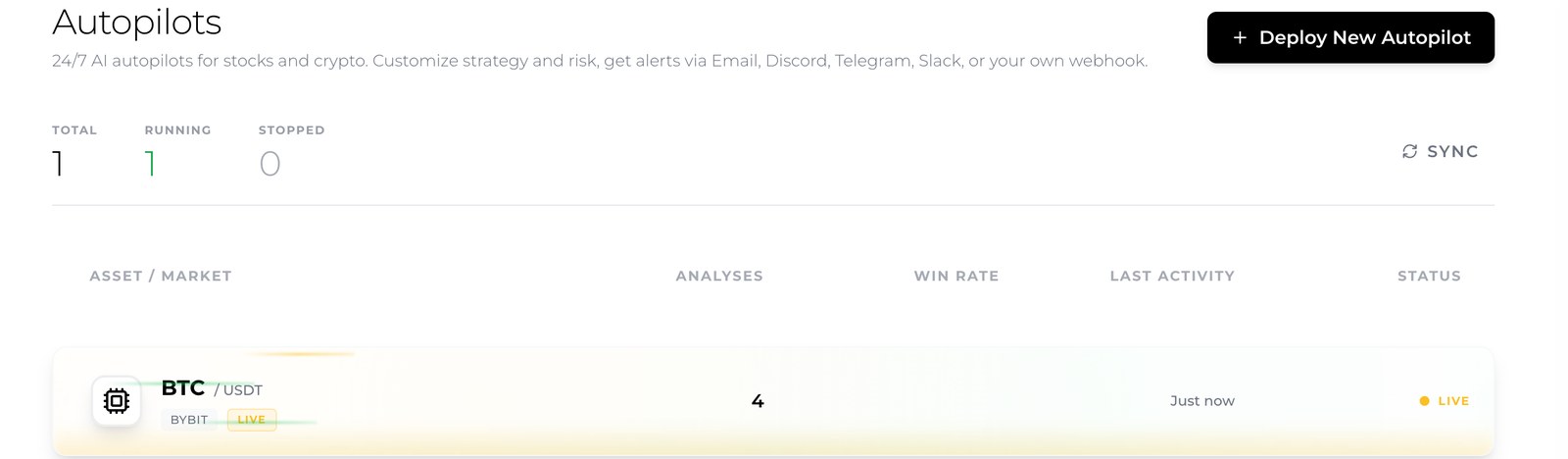
ตลอดเซสชัน แดชบอร์ดเพิ่ม จำนวนการวิเคราะห์ ขึ้นเรื่อย ๆ บันทึกเหตุการณ์ Position Opened และ Position Closed เมื่อสภาวะเปลี่ยน และยัง หยุดชั่วคราวเอง เมื่อผมเปิดเซสชันสดเพื่อดู ("ผู้ใช้กำลังดูเซสชันวิเคราะห์คริปโทสดนี้ Autopilot จะรอและสแตนด์บาย") แล้ว กลับมาทำงานต่อ โดยอัตโนมัติเมื่อผมออกไป คุณสามารถเปิด เซสชันวิเคราะห์สด ของ Autopilot ที่กำลังทำงานตัวใดก็ได้เพื่อดูเอเจนต์คิดแบบเรียลไทม์ หรือดึงบันทึกการทำงานฉบับเต็มเพื่อดูทุกการเริ่ม การเสร็จสิ้น ระยะเวลา และการแจ้งเตือน
การแจ้งเตือน: Email, Discord, Telegram, Slack และ webhook
Autopilot มีประโยชน์เท่ากับที่คุณรับรู้ว่ามันกำลังทำอะไร ดังนั้นขั้นตอนตั้งค่าสุดท้ายคือการแจ้งเตือน คุณเลือกช่องทางและเหตุการณ์ที่จะกระตุ้นมันอย่างแม่นยำ
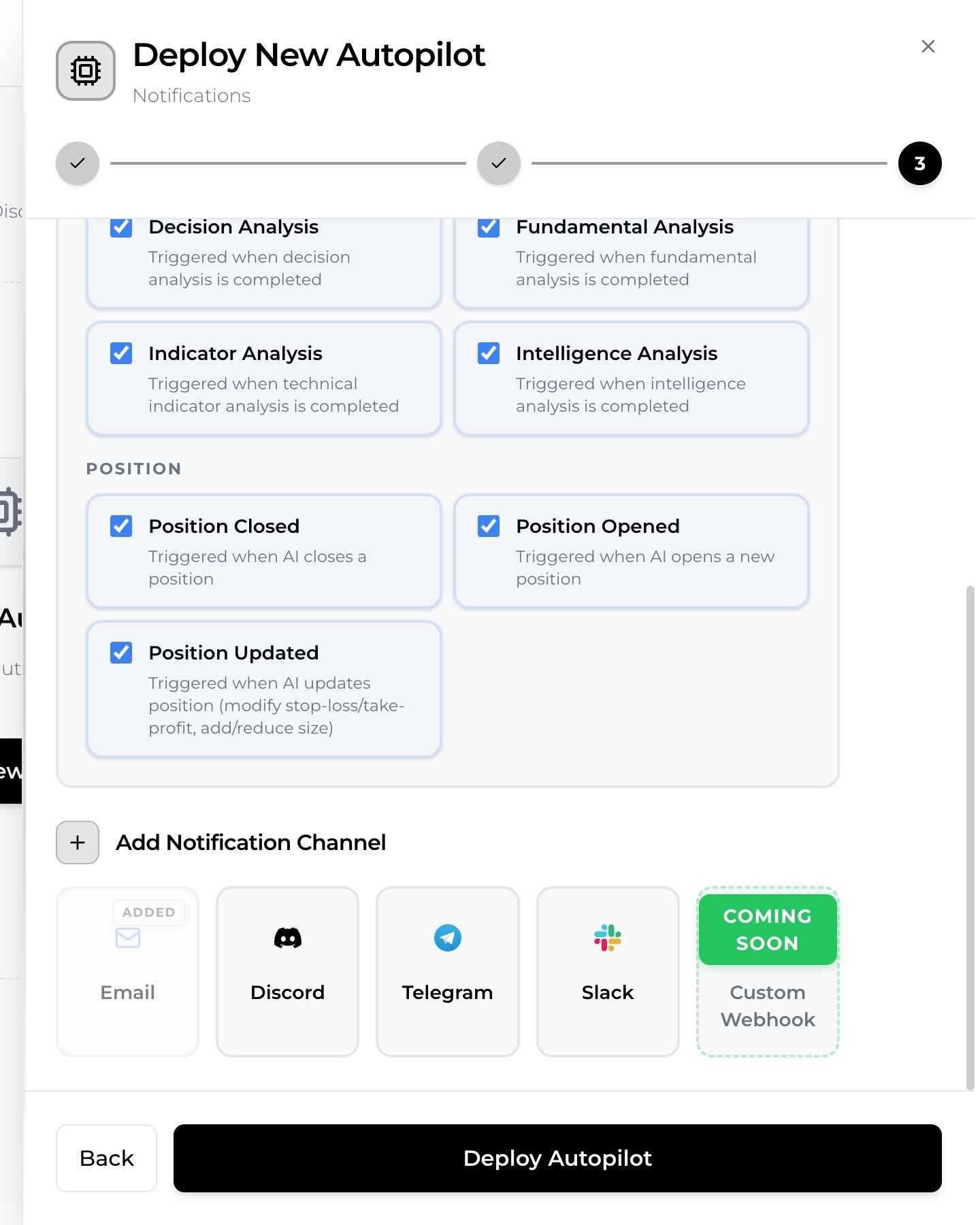
ช่องทางต่าง ๆ ได้แก่ Email (เพิ่มเป็นค่าเริ่มต้นและส่งไปยังอีเมลที่ลงทะเบียนไว้ของคุณ), Discord, Telegram และ Slack พร้อมตัวเลือก webhook แบบกำหนดเองที่กำลังจะมาสำหรับทีมที่ต้องการป้อนเหตุการณ์เข้าสู่ระบบของตนเอง เหตุการณ์ทริกเกอร์แบ่งเป็นสองกลุ่ม เหตุการณ์ การวิเคราะห์ จะทำงานเมื่อเอเจนต์แต่ละตัวเสร็จ—Indicator, Intelligence, Fundamental และ Decision Analysis เสร็จสิ้น—และเหตุการณ์ สถานะ จะทำงานในวงจรชีวิตของการเทรด: Position Opened, Position Closed และ Position Updated (เมื่อ AI แก้ Stop-Loss หรือ Take-Profit หรือเพิ่มและลดขนาด) ในการทดสอบของผม แต่ละรายการมาถึงเป็นข้อความที่สะอาดและมีโครงสร้างภายในเสี้ยววินาทีนับจากเหตุการณ์
เคล็ดลับใช้งานจริง: เปิดเหตุการณ์สถานะทั้งหมดไว้ แต่พิจารณาปิดเสียงอีเมลวิเคราะห์ Indicator ที่ความถี่สูงเมื่อคุณไว้ใจระบบแล้ว หรือกำหนดเส้นทางไปยังช่อง Discord เฉพาะเพื่อให้กล่องจดหมายของคุณสงบ
กระดานเทรด คู่เทรด และตลาดที่รองรับ
Autopilot สามารถวิเคราะห์คู่เทรดบน OKX, Bybit, Binance และ Coinbase ครอบคลุมทั้งการเทรดสปอตและสัญญา perpetual swap สินทรัพย์หลักอย่าง Bitcoin, Ethereum และ Solana มีให้บนหลายกระดาน และชุดคู่เทรดสภาพคล่องสูงถูกทำเครื่องหมายว่าฟรีเพื่อให้คุณเริ่มได้โดยไม่ติดขัด สัญญา perpetual เปิดการตั้งค่าเลเวอเรจ (สูงสุด 100× บนบางกระดาน) ซึ่งขยายทั้งโอกาสและความเสี่ยง—เหตุผลที่ดีในการพึ่งการกลั่นกรองอย่างระมัดระวังของ Decision Agent เมื่อคุณเทรดมัน
แพ็กเกจ เครดิต และขีดจำกัด
การรันเอเจนต์ AI สี่ตัวอย่างต่อเนื่องใช้เครดิต เพราะการวิเคราะห์ของเอเจนต์แต่ละตัวคือการเรียกใช้โมเดลจริง คุณจะรัน Autopilot พร้อมกันได้กี่ตัวขึ้นอยู่กับแพ็กเกจของคุณ: ระดับฟรีรองรับหนึ่งตัว Plus รองรับสามตัว และ Pro รองรับสิบตัว โดยเข้าถึงคู่เทรดได้กว้างขึ้นเมื่อคุณเลื่อนระดับสูงขึ้น คุณสามารถดูระดับปัจจุบันได้ที่ หน้าราคา หากยอดคงเหลือของคุณหมดกลางเซสชัน Autopilot จะหยุดตัวเองและส่งอีเมลถึงคุณ ดังนั้นคุณจะไม่ถูกเซอร์ไพรส์ด้วยความล้มเหลวเงียบ ๆ สำหรับผู้ใช้ส่วนใหญ่ การเริ่มด้วย Autopilot เพียงตัวเดียวบนคู่เทรดฟรีและช่วงเวลาวิเคราะห์ปานกลางคือวิธีที่คุ้มค่าที่สุดในการเรียนรู้ระบบก่อนขยายขนาด
คำถามที่พบบ่อย
นี่เป็นบอตเทรดจริงที่แตะต้องเงินทุนในกระดานของผมหรือไม่?
Autopilot ทำการวิเคราะห์ด้วย AI อย่างต่อเนื่องและบริหารสถานะที่ควบคุมโดย AI เพื่อการติดตามผลงานอย่างโปร่งใส โดยส่งเหตุผลทั้งหมดเบื้องหลังทุกการตัดสินใจให้คุณ คุณยังคงเป็นผู้กุมบังเหียนและหยุดมันได้ทันที มันคือชั้นของความฉลาดและการทำงานอัตโนมัติ ไม่ใช่การถอนเงินทุนของคุณโดยไร้การดูแล
สิ่งนี้ต่างจากบอตเทรดคริปโทธรรมดาอย่างไร?
บอตธรรมดารันกฎตายตัวข้อเดียว ส่วน Autopilot ของ SimianX รันเอเจนต์ AI เฉพาะทางสี่ตัว—เทคนิค ข่าว ปัจจัยพื้นฐาน และชั้นการตัดสินใจที่ตระหนักถึงความเสี่ยง—แต่ละตัวบนโมเดลที่คุณเลือก และจะปฏิเสธการเทรดเมื่อความมั่นใจต่ำ
ผมควรใช้โมเดล AI ใดสำหรับแต่ละเอเจนต์?
เริ่มจาก กระดานจัดอันดับเทรดคริปโทด้วย AI ซึ่งจัดอันดับโมเดลตามอัตราชนะจากการเทรดที่เสร็จสมบูรณ์จริง แล้วมอบหมายโมเดลที่อันดับสูงกว่าให้กับเอเจนต์ที่สำคัญที่สุดสำหรับกรอบเวลาของคุณ
การแจ้งเตือนมาถึงเร็วแค่ไหน?
ในการทดสอบ การแจ้งเตือนการวิเคราะห์เสร็จสิ้นและสถานะถูกส่งภายในเสี้ยววินาทีนับจากเหตุการณ์ ผ่าน Email และช่องทางอื่น ๆ
ผมรัน Autopilot ได้มากกว่าหนึ่งตัวไหม?
ได้—หนึ่งตัวในระดับฟรี สามตัวบน Plus และสิบตัวบน Pro แต่ละตัวสามารถเล็งคู่เทรด กรอบเวลา และการตั้งค่าโมเดลที่ต่างกันได้
บทสรุป
บอตเทรดคริปโทด้วย AI แบบ 24/7 ไม่ใช่สคริปต์ที่กดกฎเดิม ๆ อย่างมืดบอดอีกต่อไป ด้วย SimianX ออโตไพลอต คุณปรับใช้ทีมเล็ก ๆ ของเอเจนต์ AI ให้แต่ละตัวด้วยโมเดลที่เหมาะกับงานของมันที่สุด ปล่อยให้ Decision Agent ที่ตระหนักถึงความเสี่ยงเป็นผู้ตัดสินขั้นสุดท้าย และรับร่องรอยการตรวจสอบที่ครบถ้วนผ่านอีเมลและแชต พฤติกรรมที่สำคัญที่สุด—การพูดว่า "ไม่เทรด" เมื่อไม่มีความได้เปรียบ—ถูกฝังไว้ในตัว เลือกคู่เทรด เลือกโมเดลของคุณจาก กระดานจัดอันดับ ตั้งค่าการแจ้งเตือน แล้วปล่อยให้มันทำงาน คุณสามารถอ่านบทวิเคราะห์เชิงลึกของ SimianX เพิ่มเติมได้เสมอที่ ศูนย์รวมเรื่องราว
อ่านเพิ่มเติม
- AI crypto autopilot เทรด 24/7 ได้อย่างไร (คู่มือฉบับสมบูรณ์ 2026)
- บอทเทรด AI กับ Copy Trading: ระบบเทรดอัตโนมัติแบบไหนชนะในปี 2026
- โมเดล AI ตัวไหนเป็นนักเทรดที่ดีที่สุด? จัดอันดับด้วยค่า R เฉลี่ย
- 30+ โมเดล AI จัดอันดับสด: ลีดเดอร์บอร์ดคริปโตจริง ปี 2026
- BTC vs ETH vs SOL: โซนซื้อที่ดีที่สุดในช่วงตลาดคริปโตร่วงปี 2026
- ห้องบัญชาการ AI คริปโตเรียลไทม์: รวม 3 เอ็กซ์เชนจ์ใหญ่ครบ
- SimianX AI vs TradingView: ดวลสัญญาณเรียลไทม์แบบสด ปี 2026