
Why Round-the-Clock Crypto Needs an AI Autopilot
Crypto markets never close. Bitcoin prints highs at 3 a.m. Tokyo time, Solana flushes during the New York lunch hour, and every weekend a liquidation cascade can erase a week of patient swing-trading. The single most expensive thing a discretionary trader does is sleep.
An AI crypto autopilot is software that watches the market every minute you cannot — running technical analysis, weighing news and on-chain data, sizing a position, opening it, managing stops, and closing when the conditions turn. The honest version of this product is not a magic money button. It is a disciplined operator that never fatigues, never panics, and never forgets the rules you set.
This guide is the one we wish existed when we first started building SimianX's Autopilots product. It covers what an AI autopilot actually is in 2026, the four-agent architecture that makes one work, how a real position gets opened end-to-end, the risk controls that matter, the alert channels you should wire up before going live, and a step-by-step setup walkthrough. Whether you are trading Bitcoin, Ethereum, or the long tail of mid-cap alts, the principles are the same.
What an AI Crypto Autopilot Actually Is
The phrase "trading bot" has been around since the MT4 era. The legacy meaning — a rules-based script that places orders when condition X is true — is not what an autopilot is in 2026.
A traditional grid bot or signal service is a flat decision tree. It checks indicators, compares them to thresholds, and fires an order. It has no context, no memory, no judgment. When the regime shifts from trend to chop, the rules that worked yesterday cost you money today.
An AI autopilot is structurally different. At its core is a continuous reasoning loop powered by a large language model — typically Claude, GPT-5, Grok, Gemini, or one of the open-weight frontier models — that consumes a structured snapshot of the market and produces a structured decision: direction, conviction, position size, and exit plan. Crucially, the LLM does not see raw price ticks. It sees the output of specialized agents, each of which has already done its own analysis on a narrow slice of the world. The LLM's job is to integrate, weigh, and decide.
This matters because the failure mode of a rules bot is silent. The failure mode of an autopilot is auditable: you can read its reasoning, see which agent flipped, and know exactly why it sized this position at 1.2x instead of 3x. The same property that makes LLMs useful for research — they explain themselves — makes them useful for trading oversight.
The Four Agents That Power Every Autopilot
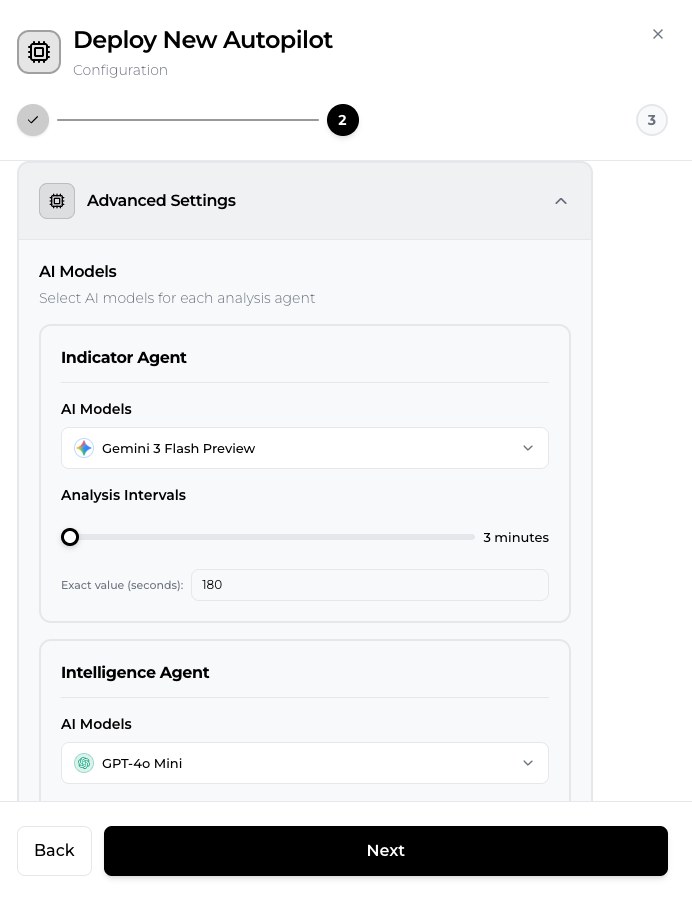
Inside SimianX's autopilot architecture, four specialist agents run in parallel on every analysis cycle. Each produces a structured signal with a direction, a strength score, and a confidence number. A fifth decision agent integrates them.
Indicator Agent
The indicator agent is the closest thing to a traditional technical-analysis engine. It computes RSI, MACD, EMA crossovers, Bollinger Bands, volume profiles, and a handful of less-publicized momentum and mean-reversion measures across multiple timeframes (15m, 1h, 4h, 1d). What sets the AI version apart is that the agent does not just emit "RSI = 72." It synthesizes: "RSI is overbought on 1h but neutral on 4h, MACD is rolling over on 1h with declining histogram, and price is testing the lower Keltner on 15m — short-term distribution into a longer-term uptrend."
That kind of contextual read is what the decision agent needs to weigh against the other signals.
Intelligence Agent
The intelligence agent watches what people are saying. It ingests news headlines, exchange announcements, regulatory updates, prediction-market odds from sources like Polymarket, and (where licensing permits) curated social sentiment. Its output is a sentiment vector with a confidence: "broadly neutral on BTC over the last 6 hours, but a strongly negative cluster around a specific exchange's reserves." Sentiment alone is a terrible trading signal. Sentiment paired with technicals is one of the strongest contextual filters available.
Fundamental Agent
For crypto, "fundamentals" means on-chain data and market structure, not P/E ratios. The fundamental agent tracks active address counts, exchange netflows, stablecoin supply trends, perpetual-futures funding rates, open-interest changes, and basis spreads. A common high-value pattern: funding flips sharply positive while exchange inflows of the same asset spike — a recipe for a long-side liquidation cascade. The fundamental agent flags this kind of structural set-up days before it shows up on a chart.
Decision Agent
The decision agent is the synthesizer. It receives the three specialist outputs plus the current position state (if any), the user's risk parameters, and a description of the broader regime. It produces a single decision: open / close / update / hold, plus direction, entry, stop loss, take profit, and position size. The decision is wrapped in a paragraph of natural-language reasoning that gets logged with the order. This is what you read the next morning when you want to know why the autopilot sold half your ETH at 3:47 a.m.
The interplay between the four agents is what makes the system meaningfully different from a rules bot. The indicator agent might say "long, strength 0.6, confidence 0.7." The intelligence agent might say "neutral, confidence 0.5." The fundamental agent might say "short, strength 0.8, confidence 0.85 — funding flipped, inflows spiking." The decision agent, weighing all three against the user's bias and current exposure, may choose to not open despite a bullish indicator read — because the structural picture is loud, recent, and confident. That is the kind of nuance you simply cannot encode in if-statements.
From Signal to Position: How an Order Actually Gets Placed
A signal is not an order. Between the decision agent's output and the exchange API call sit a sequence of guards that exist to keep small disagreements from becoming large losses.
Confidence Threshold
Every autopilot is configured with a minimum confidence value — typically between 0.6 and 0.85 depending on the trader's appetite. A decision agent's signal is discarded entirely if its confidence falls below this threshold. In practice this filters out roughly 40 to 60 percent of all signals on most coins, and the win rate of the surviving signals is meaningfully higher. The math is straightforward: fewer trades at higher conviction beats more trades at average conviction once you account for fees and slippage.
Direction and Position Sizing
The signal carries a direction (long or short) and a strength score. The autopilot translates strength into position size using a base allocation (a percentage of the configured trading capital) multiplied by the strength. A strength-0.9 long on BTC at a base 5 percent allocation becomes a 4.5 percent position; a strength-0.4 long becomes 2 percent. This is intentional — large positions should be taken only when the model is convinced, and conviction is measured, not assumed.
Entry, Stop Loss, and Take Profit
Each open instruction includes an entry zone (usually market, occasionally a limit if the signal is anchored to a level), a hard stop loss, and one or two take-profit levels. Stops are typically placed beyond a structural level — the recent swing low for a long, an obvious resistance flip for a short — not at a fixed percentage. This matters because price tends to wick to where stops cluster, and a stop placed at "5 percent below entry" gets hunted; a stop placed at "10 ticks below the prior 4h swing low that held three times" usually does not.
Update vs Close
Once a position is open, every analysis cycle re-evaluates it. The decision agent can issue an update (move the stop, adjust the take-profit, scale in or out) or a close. A common autopilot behavior is to trail the stop upward as the trade moves in profit, locking in gains while leaving room for the trend to extend. Every update is logged with a reason, so when you wake up to a smaller-than-expected profit, you can read why the autopilot took it.
Risk Controls That Matter
The configuration screen of a serious autopilot has a dozen knobs, and most of them are about not trading. This is the most important inversion to understand.
Minimum Confidence
Discussed above. Tighter is safer; too tight starves the autopilot of trades and you end up paying for software that does nothing. Most live SimianX autopilots run between 0.65 and 0.80 depending on the asset's volatility.
Direction Restriction
Restrict to long-only or short-only when your account, jurisdiction, or thesis demands it. Long-only is common for spot-only accounts; short-only is common for hedging an existing portfolio. The autopilot still runs the full four-agent analysis but ignores any signal that violates the restriction.
Symbol Whitelist
Limit the autopilot to a specific set of coins — for example, BTC, ETH, and SOL. This is critical for two reasons: it caps your effective exposure, and it concentrates the AI's attention on assets you have edge in. Watching 200 symbols with one autopilot is almost always worse than running one autopilot per major asset.
Minimum P&L Percent
A filter on signal updates that suppresses noise. If a take-profit move would only realize 0.3 percent, you skip it; the fees would eat most of the gain. Setting the minimum P&L percent to 1.0 means "do not bother me unless the move is material."
Rate Limits
Three values matter: max per hour, max per day, and cooldown seconds. The cooldown is the most useful — it prevents the autopilot from chopping itself up during a single volatile candle. Sixty to 120 seconds is typical.
Auto-Disable on Failures
Every autopilot's notification delivery is monitored. Five consecutive failures (a bad webhook URL, a Discord channel that was deleted, a Telegram bot that got banned) and the notification auto-disables. The trade execution continues; only the alerting goes quiet. This is the right behavior — you want orders to keep firing even when your Slack workspace breaks.
Common Failure Modes (and How to Avoid Them)
After watching hundreds of SimianX autopilots run for thousands of hours combined, the same handful of failure modes show up over and over. None of them are bugs in the autopilot — they are user-side patterns that turn a working system into a losing one. Recognize them before you fall into them.
Tweaking parameters every time the market chops
The first week of running an autopilot is statistically meaningless. Six trades, 12 trades, 30 trades — none of these are enough to draw a conclusion about whether your minimum-confidence threshold is too tight or too loose. The most common mistake new users make is loosening confidence after three losing trades and then tightening it after the next two losers cluster up. By the end of the second week the parameters have been moved four times and there is no sample of actual behavior under a fixed config. Pick a config, write down why you picked it, and leave it alone for two weeks at minimum. Then evaluate.
Manually closing positions the autopilot wants to keep
This is the single most expensive habit. The autopilot opened a position with a structural stop loss and a structural take profit. You watch the price move against you, panic, and close at break-even — only to see the stop hold and the trade run to target without you. The decision agent's edge is in not panicking; if you panic for it, you give back the edge. The same logic applies in the other direction: closing a winner early because you feel anxious leaves money on the table that the autopilot's exit logic would have captured.
Running too many autopilots at once
There is no prize for breadth. Two autopilots on BTC and ETH that you understand thoroughly will outperform six autopilots on six coins you can barely keep straight. The reason is simple: every autopilot needs at least a daily glance for sanity checks, and your attention compounds — you start to notice that a particular model handles funding-rate flips well, or that your indicator-agent interval is too aggressive on 15-minute candles. That intuition cannot form across six coins at once.
Fighting the model in chop
When the market goes sideways for a week, the autopilot will often produce a series of small losing trades — each entered with reasonable confidence, each stopped out as the range fails to develop. Your instinct is to disable it. Your discipline should be to leave it alone unless the frequency of trades exceeds your max-per-day limit, or the cumulative drawdown breaches a threshold you set in advance. Chop is part of the regime cycle. The autopilot survives chop; you survive chop only if you do not turn it off at the bottom of one.
Not reading the decision agent's reasoning
The single highest-leverage habit you can build is reading the decision agent's natural-language reasoning for every open and close, especially in the first month. You will learn how the model thinks. You will catch genuine misreads (it confused a halving narrative for a regulation narrative; it weighted Polymarket odds too heavily during a low-liquidity weekend) and you will gain conviction in the ones it got right. Treat the reasoning log as a daily reading habit, not as a forensic tool you only open after a loss.
Real-Time Alerts: Five Channels, One Decision Per Channel
An autopilot that runs silently is an autopilot you do not trust. The single best habit you can build is to wire up at least two notification channels before you fund the account.
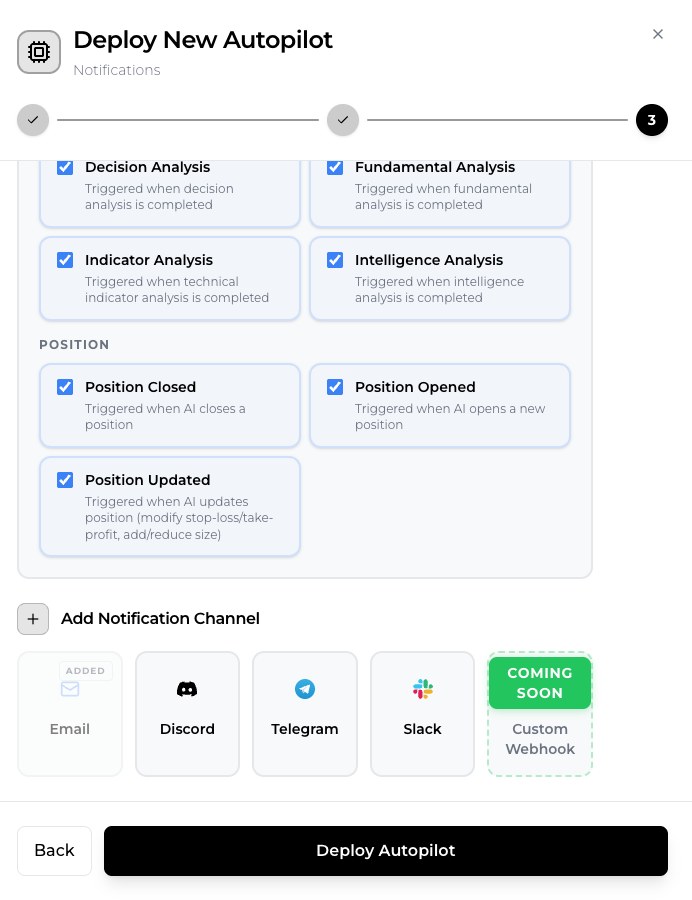
SimianX autopilots support four live delivery channels today — Email, Discord, Telegram, and Slack — with a fifth, Custom Webhook (API POST), marked Coming Soon in the deploy wizard. Each live channel is fully wired with rich, agent-specific formatting — Discord embeds include the RSI, MACD, and EMA snapshot at the time of decision; Telegram messages use MarkdownV2 with proper escape handling; Slack uses Block Kit; and the upcoming custom webhook will deliver a structured JSON payload with the full signal and analysis tree.
The right combination depends on your urgency tolerance:
- Email — best for daily digests and close events. Slow channel, full content.
- Discord — best for a personal trading server you check on your phone. Threaded, scannable, persistent.
- Telegram — best for true real-time alerts on position open and close. Push notifications are instant and the format is clean.
- Slack — best for team accounts where multiple people share oversight of an autopilot.
- Custom Webhook — best for traders who want to pipe the payload into their own dashboard, spreadsheet, journal, or risk system. The full structured analysis is in the JSON, so you can build whatever you want on top.
Every channel supports filter conditions: you can configure email to only fire on position-opened and position-closed events, while Telegram fires on everything including the four analysis-completed events. This keeps the loud channels signal-only.
Setting Up Your First Autopilot in SimianX
Here is the practical sequence from logged-in account to a live autopilot. The first one takes ten minutes; subsequent ones take two.
- Open the Autopilots page. Click Create New Autopilot.
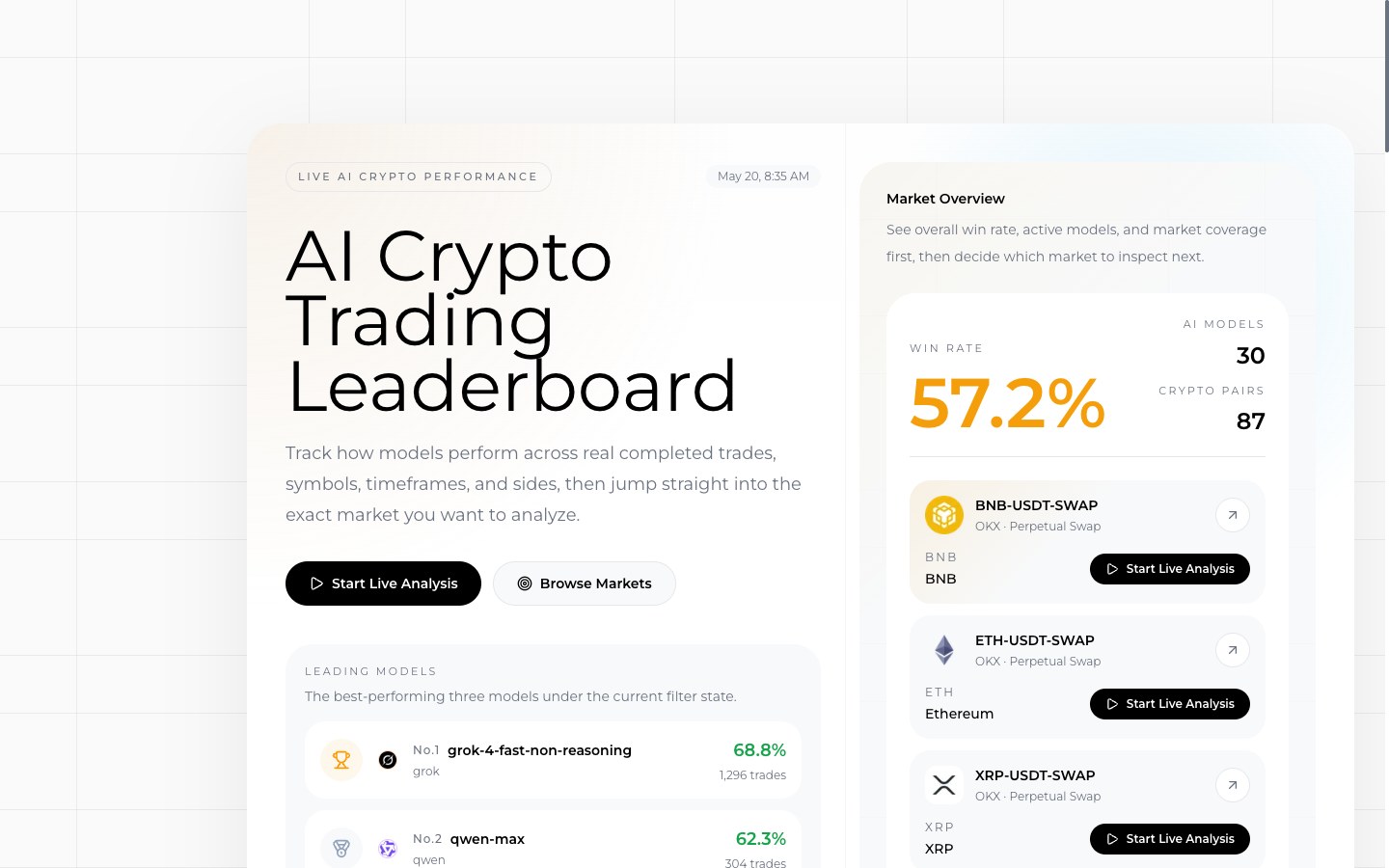
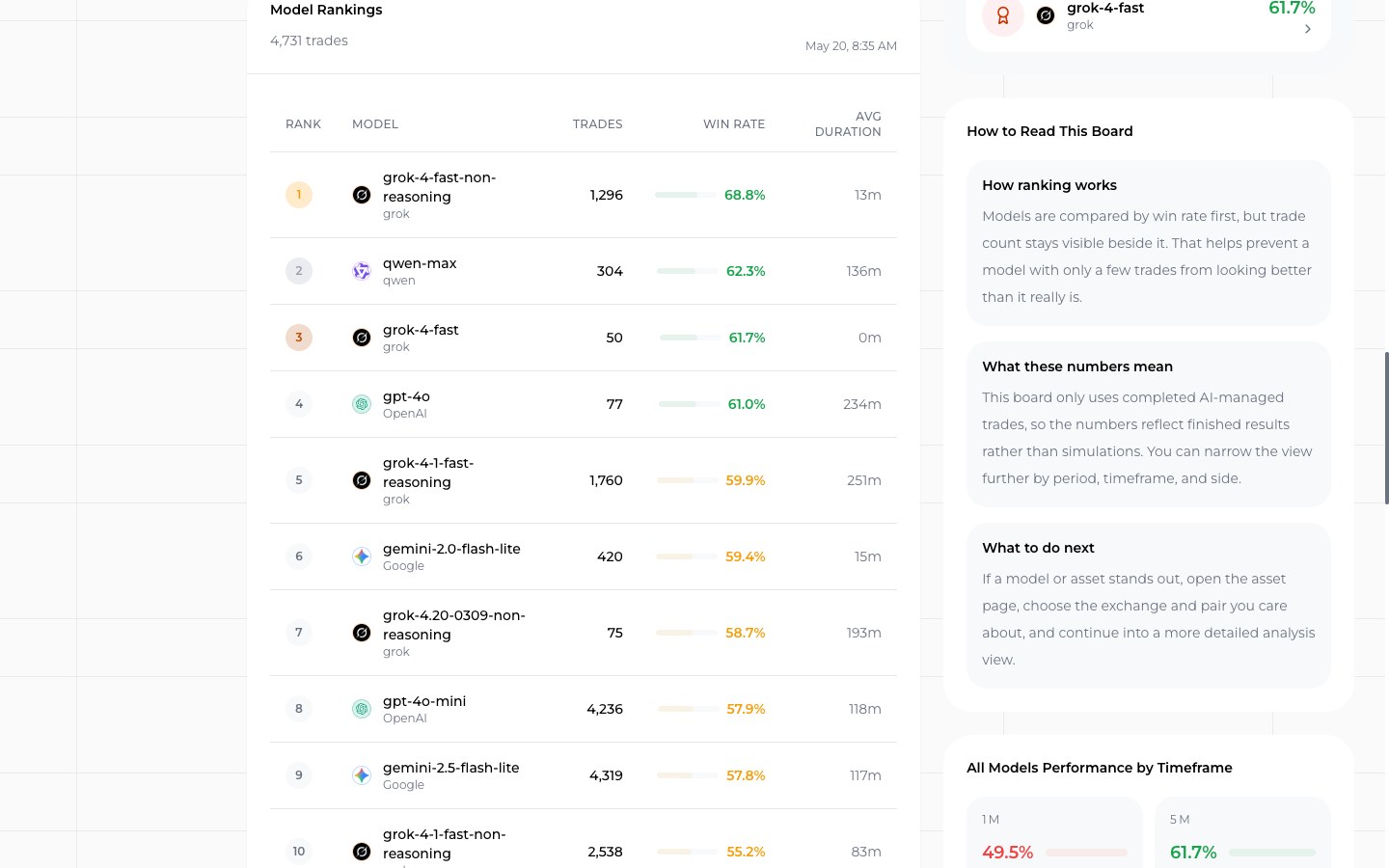
- Pick the asset. For your first run, choose a single major: BTC, ETH, or SOL. Cross-reference the Crypto Leaderboard to see which AI models have been performing best on that asset over the recent window. The leaderboard is updated continuously from real model positions on the live crypto session.
- Pick the AI model. Different model families have different temperaments. Claude tends toward higher conviction and lower trade frequency. GPT-5 trades more often. Grok and DeepSeek have distinct signatures on volatile sessions. The leaderboard performance over the last 30 days is the best guide.
- Set the trading capital. This is the notional amount the autopilot will size positions against. Start small — under what you can afford to lose entirely.
- Set the risk parameters. A reasonable first config: minimum confidence 0.70, direction both, symbols BTC only, minimum P&L percent 1.0, max per day 6, cooldown 120 seconds. You can loosen later once you trust the behavior.
- Wire up notifications. At minimum, Email for everything plus Telegram for position events. Test each channel before you start.
- Start the autopilot. It will begin its first analysis cycle within a minute and place its first trade only when the four agents agree above your confidence threshold. The first day is normal to see two or three trades, or zero. Zero is fine.
Watch the first few trades closely. Read the decision agent's reasoning. If the autopilot is opening positions you would not have opened — or holding positions through obvious invalidation — the right move is to tighten the confidence threshold, not to override it manually. Manual overrides break the feedback loop the autopilot needs to be useful.
Frequently Asked Questions
Is an AI autopilot profitable?
The honest answer: it depends on the model, the asset, the regime, and the parameters. Some autopilots on SimianX have produced excellent results over multi-month windows; others have not. The Crypto Leaderboard shows live performance across every active model, with no cherry-picking. Use it.
How is this different from a regular trading bot?
A trading bot executes rules. An autopilot reasons. The difference shows up most clearly during regime changes — when a market moves from trend to chop or from low volatility to high — and during black-swan events, where a rules bot keeps firing inappropriate orders while an autopilot pauses, downgrades confidence, or rotates direction.
What AI models can I use?
SimianX currently supports models from six providers, including Anthropic (Claude family), OpenAI (GPT-5), xAI (Grok), Google (Gemini), DeepSeek, and Alibaba (Qwen). Each model produces a different trading signature, and all of them are ranked side-by-side on the AI crypto leaderboard.
Do I need to watch the autopilot constantly?
No — and you should not. Set up notifications, check the daily summary, and intervene only when the strategy itself is wrong. Constant intervention is the single most common reason autopilots underperform.
How much capital do I need to start?
Mechanically, very little — most exchanges allow minimum trade sizes in the $10 to $50 range. Practically, you want enough capital that the per-trade move is meaningful but small enough that an early loss does not change your behavior. Most users start in the low four figures.
What if my notification channels stop working?
Trade execution continues uninterrupted. After five consecutive delivery failures (or an 80 percent failure rate over the last ten deliveries) the affected channel auto-disables and a status flag flips on the autopilot dashboard. Fix the channel, re-enable, and it resumes. See the pricing page for current plan-level notification limits.
Can I run more than one autopilot at the same time?
Yes. The recommended pattern is one autopilot per major asset, each with its own AI model. This lets you compare how different models perform on the same coin and how the same model performs on different coins. The dashboard shows them side-by-side.
How do I compare two autopilots' performance head-to-head?
Run them on the same asset with the same trading capital, same confidence threshold, and same direction restriction for at least two weeks. The dashboard exposes win rate, average duration, total P&L, and trade count per autopilot. Once you have 30+ closed trades per side, the comparison starts to mean something. Below that, you are reading noise.
Can the autopilot trade on margin or with leverage?
When the chosen trading pair is a perpetual-swap contract — you'll see it in the trading-pair search results, for example BTC-USDT-SWAP on OKX with up to 100x leverage available, or the same pair on Bybit Swap at 100x — the autopilot can take leveraged positions. The risk controls apply just the same; minimum confidence, position sizing, and stop placement all scale with leverage. Spot pairs (BTC-USDT SPOT on Binance or OKX) trade without leverage and are the recommended starting point for first-time users.
What does the first week of running an autopilot actually look like?
Realistically: between zero and six trades, depending on confidence threshold and chosen timeframe. A few of those will win, a few will lose. The win rate over six trades is meaningless. What you are watching for in week one is not P&L — it is whether the trades the autopilot opened are the kind of trades you would have wanted opened, in the kind of conditions you expected it to trade. That qualitative read is more valuable than the early dollar number.
The 2026 Outlook
The autopilot category is in the early innings. The most interesting developments over the next twelve months are not in the indicator math — that is mature — but in the integration layer: which agents get added, how they vote, how the LLM weights short-horizon technicals against multi-day on-chain signals, and how transparently the reasoning is exposed to the user. Expect the next generation to add a dedicated derivatives-flow agent, a deeper on-chain agent for ETH and Solana ecosystems, and meaningfully better risk-overlay logic.
What is not going to change: the asymmetry of attention. The trader who reads charts six hours a day is fighting a structurally losing battle against a system that reads them every minute and never gets tired. Hand the boring work to the autopilot. Spend your hours on the parts of trading that still require a human.
When you are ready to try one yourself, the Autopilots page is one click away — and the daily performance of every active model lives on the Crypto Leaderboard.
Related Reading
- AI Crypto Trading with Real-Time Insights via SimianX
- Real-Time AI Crypto Command Room: Coinbase, Binance, Bybit
- Multi-Agent AI Cryptocurrencies for Real-Time Trading