
 By Marcus Reeve
AI Agents for Investing and the Model Context Protocol (MCP), Explained
Quick answer (October 2026): An AI investing agent is a language model that can plan a task, call tools for market data or analysis, read the results and decide what to do next, instead of only answering from memory. The Model Context Protocol (MCP) is the open standard most of these agents now use to plug into those tools: a data provider publishes an MCP server with a list of tools (get a quote, pull candles, read the news, run an analysis), and any MCP-capable app, such as Claude, ChatGPT, Cursor, Codex, VS Code or Gemini CLI, can call them. MCP moves data; it does not make an agent a better investor. Treat every agent's output as information, not advice, and keep it on paper trades or read-only data until you have checked its record.
Updated October 18, 2026. Facts on MCP come from the official specification and the announcements linked below; product details are as of SimianX MCP 1.0.2.
Two search questions sit behind this page. Investors ask what an "AI trading agent" really is and whether it can be trusted with a portfolio. Builders ask what MCP is and how to give an agent live stock market data through an MCP server. The answers are connected, because the protocol decides what an agent can see and do, and that in turn sets its risks. This guide covers both, with three reference tables you can cite: the main types of AI investing agents, the data each type needs, and how MCP compares with a plain API and with agent skills.
What Is an AI Agent for Investing?
An AI agent is a model running in a loop: it reads a goal, picks the next step, calls a tool, looks at the result and repeats until it is done or a person has to approve something. Our explainer What Are AI Agents? How Multi-Agent AI Systems Work covers that loop in depth. Applied to markets, an investing agent is that loop pointed at financial questions:
- A chatbot answers "What is a P/E ratio?" from its training data. It has no prices, no news after its cutoff and no way to check itself.
- A trading bot follows fixed rules ("buy when the 50-day average crosses the 200-day") with no language model involved.
- An AI investing agent decides which data it needs, fetches it through tools, reasons over it and returns an answer, a plan or, if it has been given that permission, an order.
The difference that matters for an investor is the last step. Most agents in 2026 stop at research: they read data and write analysis. A smaller group manages a paper portfolio. Very few should place real orders without a human approving each one, and the regulators quoted later in this guide expect firms that use them to keep that kind of supervision. Our beginner's guide to agentic AI investing walks through the observe, orient, decide, act cycle in plain terms.
What Is MCP (Model Context Protocol)?
The Model Context Protocol is an open standard for connecting AI applications to outside data and tools. Anthropic introduced it on November 25, 2024. OpenAI said in March 2025 that it would support MCP across its products, and Google followed in April 2025. On December 9, 2025, Anthropic donated MCP to the Agentic AI Foundation, a fund under the Linux Foundation co-founded with Block and OpenAI, saying there were already more than 10,000 active public MCP servers.
The simplest way to picture MCP is a universal plug. Before it, every AI app needed custom code for every data source. With MCP, a data provider writes one server, and every MCP-capable app can use it.
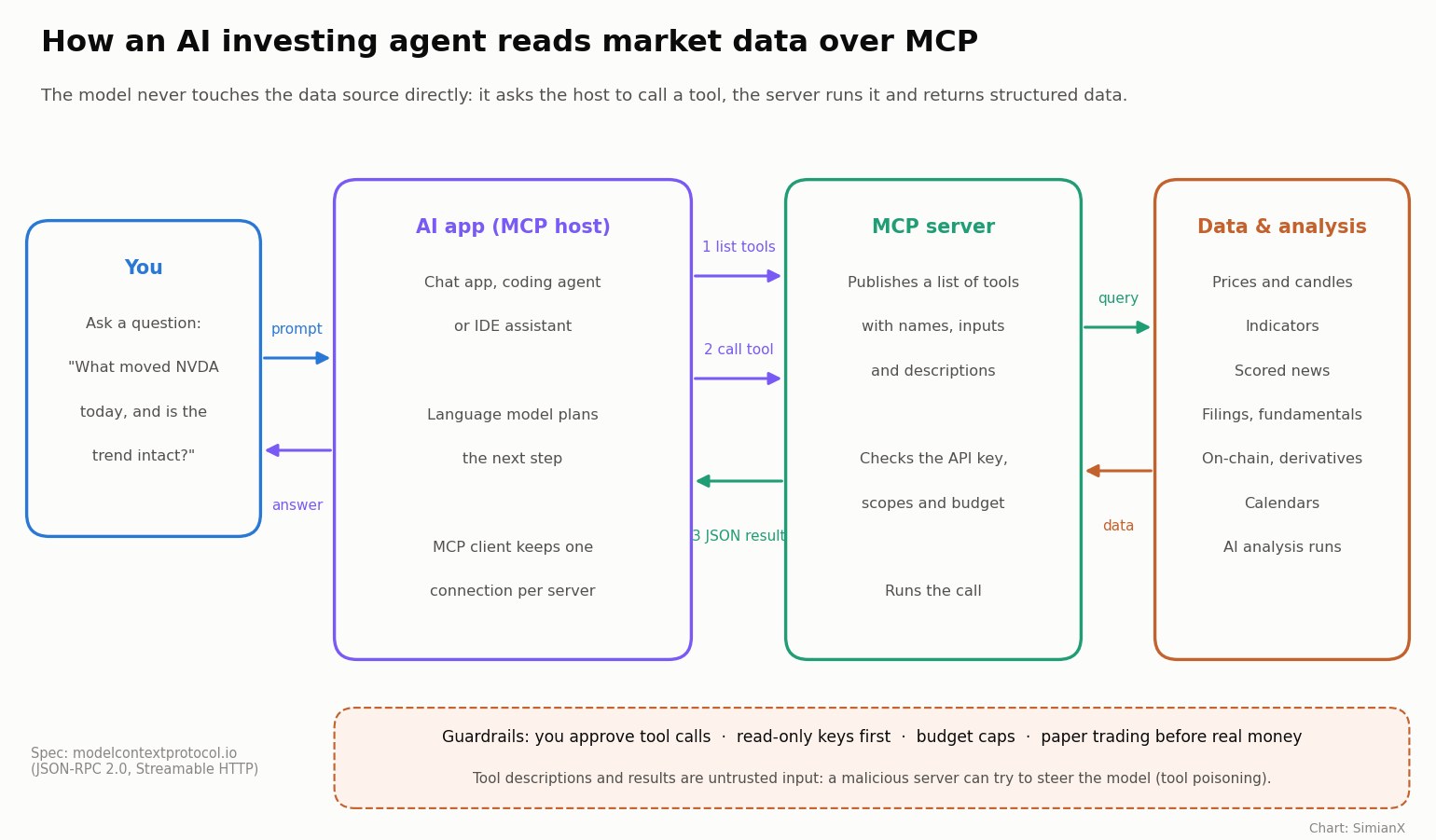
The specification defines three roles and three main building blocks:
- Host: the AI application you talk to (a chat app, a coding agent, an IDE assistant).
- Client: the connector inside the host that keeps a connection to one server.
- Server: the service that offers capabilities, for example a market-data or analysis provider.
- Tools: functions the model can call, such as "get candles for BTC on the 1-hour timeframe".
- Resources: data and context the user or the model can read, such as a file or a report.
- Prompts: ready-made templates and workflows the user can pick.
Messages use JSON-RPC 2.0, and remote servers are reached over HTTP (the "Streamable HTTP" transport). The current revision of the specification is dated July 28, 2026. Each tool comes with a name, a plain-language description and a schema for its inputs, which is how a model knows that get_crypto_candles exists and what arguments it needs.
How an AI Agent Calls Market-Data Tools Over MCP
Here is what happens when you ask an MCP-connected agent "What moved NVDA today, and is the trend intact?":
- Discover. When the connection opens, the client asks the server for its tool list. The model now sees tools such as "search instruments", "get news" and "run an analysis", each with its description.
- Plan. The model decides it needs the right symbol, today's news and a read of the chart.
- Ask for permission. The host shows the proposed tool call. The MCP specification says hosts must get the user's explicit consent before invoking any tool, so a well-built app lets you approve, auto-approve read-only tools, or refuse.
- Call. The client sends the call with its arguments. The server checks the API key, its permissions and its budget, then runs the query.
- Return. The server sends back structured data (JSON), not prose. Prices, timestamps and scores arrive as numbers the model can quote.
- Reason and repeat. The model reads the result, may call another tool, and finally writes the answer with the figures it actually received.
The important point for investors is step 5. An agent that pulls numbers through a tool can show where each figure came from. An agent answering from memory cannot, and that is where invented prices come from.
Types of AI Investing Agents Compared
Most products and projects fall into one of six approaches. The table is a reference for what each one does, the data it needs and where it tends to fail.
| Approach | What it does | Data it needs | Main risks | Human role |
|---|---|---|---|---|
| Chat assistant, no tools | Explains concepts, summarizes what it already knows | None at run time (training data only) | Out-of-date facts, invented prices and dates | Reads and verifies everything |
| Research agent with data tools (MCP or API) | Pulls quotes, candles, news and filings, then writes an analysis | Prices, indicators, news, fundamentals | Misreading a tool result, stale or delayed data, prompt injection from tool content | Asks the question, checks sources |
| Multi-agent analysis committee | Specialist agents (chart, news, fundamentals) feed a decision agent or debate a verdict | All of the above, at the same moment | Agents agreeing on a wrong premise, higher cost per run | Reads the plan, decides |
| Scheduled agent on a paper portfolio | Runs the analysis on a timer and manages a simulated position with entries and stops | Live prices plus its own position history | Overtrading, drift from the plan, fees ignored in paper results | Sets limits, reviews the log |
| Brokerage-connected execution agent | Places or changes real orders through a broker's API | Live prices, account balance, positions | Real money lost to one bad call or one compromised tool, regulatory exposure | Must approve each order |
| DIY open-source framework | A framework such as the research project TradingAgents that you wire to your own data and model | Whatever you connect | Backtest overfitting, look-ahead bias, unsupervised keys | You own every part |
Two patterns stand out. Risk rises sharply between the fourth and fifth rows, because a paper loss teaches and a real loss costs. And every row below the first depends on data quality more than on the model: an agent with a frontier model and 30-minute-old prices will still be late.
What Market Data an Investing Agent Needs
| Data type | Why the agent needs it | How fresh it must be | Common pitfalls |
|---|---|---|---|
| Quotes and candles (OHLCV) | Price level, trend, volatility, entry and stop levels | Seconds to minutes for trading; daily for investing | Delayed feeds on free tiers; mixing time zones; split-unadjusted history |
| Technical indicators | Momentum, trend strength, support and resistance | Same as the candles they are computed from | Recomputing on partial candles; different formulas between providers |
| News with sentiment | Explains moves, flags catalysts | Minutes | Headlines without the article; old stories resurfacing; sarcasm and rumor |
| Fundamentals and filings | Valuation, earnings, insider trades | Quarterly, plus filing dates | Restated numbers; confusing fiscal and calendar quarters |
| On-chain and derivatives data (crypto) | Funding rates, open interest, flows | Minutes to hours | Exchange-specific quirks; thin liquidity on small pairs |
| Calendars and catalysts | Earnings dates, central bank meetings, drug approval dates | Days ahead | Moved or cancelled events |
| Account and positions | What the agent already holds, its budget | Real time | Agent acting on a stale position; keys with more access than needed |
When you evaluate an MCP server for stock market data, check three things before the tool count: how delayed each data type is on your plan, whether results carry timestamps, and whether the server returns structured numbers rather than paragraphs of text.
MCP vs API vs Agent Skills
MCP does not replace APIs. Most MCP servers sit in front of an existing API and translate it into tools a model can discover. Agent skills are a third, complementary way to teach an agent a workflow.
| REST API | MCP server | Agent skill (SKILL.md) | |
|---|---|---|---|
| Who it is for | Developers writing code | Any MCP-capable AI app | Agents that read skill files |
| How the agent learns it | A developer reads the docs and writes code | The app lists the tools and their descriptions at run time | The agent reads a short instruction file, then calls the API |
| Setup | Write and maintain client code | Add one server address and a key | Install a folder, add a key |
| Strengths | Full control, any language, easy to test | No code; one server works in many apps | Teaches the order of calls and good habits, not only the endpoints |
| Weak spots | Every app needs its own integration | Tool descriptions are trusted input; long tool lists cost context | Depends on the agent following instructions |
For a builder, the practical rule is simple: use the API in production code you control, MCP when you want the same data inside chat apps and coding agents without writing glue code, and a skill when you want the agent to follow a proven workflow.
How to Connect an AI Agent to Market Data
The steps are the same for most providers:
- Pick a server whose data you trust. Check coverage (which stocks, ETFs, crypto pairs), delay by plan, and whether it is an official server from the data owner or a third-party wrapper.
- Create a dedicated API key for the agent. Never paste your website password or a brokerage login into an agent. Give the key only the permissions it needs and a spending cap.
- Add the server to your AI app. Most apps take a server URL plus an
Authorizationheader, or a short JSON entry in a config file. - Start with read-only calls. Ask for a quote or the latest news and compare the numbers with a source you trust.
- Keep a log. Save which tools were called and what they returned, so you can audit any conclusion later.
Example: the SimianX MCP server
SimianX runs a remote MCP server at https://service.simianx.ai/v1/mcp (Streamable HTTP). It uses your SimianX API key as a bearer token and is listed in the MCP Registry as io.github.SimianX-AI/simianx. In version 1.0.2 it publishes 55 tools that mirror the SimianX API, including:
run_live_analysisandget_live_analysis: four AI analysts read one US stock or crypto pair at the same time (Indicator reads the chart, Intelligence the news flow, Fundamental the filings or on-chain data, and Decision weighs the three and proposes entry, stop and target). The same agents run on the live analysis page.get_newsandget_pulse_events: the scored news stream and the sudden price moves behind Market Pulse, each article tagged with symbols, a value score and a sentiment.search_instruments,get_crypto_quotes,get_crypto_candlesandget_crypto_indicators: symbol lookup, prices, candles and an indicator snapshot.start_deep_analysisandask_deep_analysis: the eight-agent deep research committee, with follow-up questions. Our story on the 8-agent committee you can ask shows what it returns.create_autopilotandget_autopilot_events: the same live agents on a schedule with a paper position and an event log, as on the autopilots page.
Adding it to Claude Code is one command (the setup for Claude Desktop, Cursor, Codex, VS Code, Windsurf and Gemini CLI is in the simianx-skills repository):
bashclaude mcp add --transport http simianx https://service.simianx.ai/v1/mcp --header "Authorization: Bearer $SIMIANX_API_KEY"
What to know before you connect it:
- Points, not a separate bill. Calls use your plan's points at the same rates as the website. Simple data calls cost a fraction of a point (for example 0.1 points for crypto quotes and 0.2 for candles); AI analysis is metered on the models used, from about 2 points for a live analysis with a fast model to about 200 with a frontier model. The free plan comes with 25 points a day and one API key. Current rates are on the pricing and points pages.
- Delays by plan. News and Market Pulse run 30 minutes behind on the Free and Starter plans; the live news stream is for Plus and Pro.
- Keys, not logins. An agent can sign you in by a browser approval link or a six-digit email code, and it only ever receives an API key, never a website session. Keys can carry scopes, daily and monthly budgets, a per-call cap and an IP allowlist, and you can revoke one from My Account at any time.
- Paper positions only. SimianX never places trades in a real brokerage account. Autopilot positions are simulated.
- Analysis, not advice. The output is information about markets. It does not know your finances and is not a recommendation to buy or sell.
If you prefer a skill or plain HTTP, the same functions are available through the agent page, the SKILL.md file and an OpenAPI description at https://service.simianx.ai/v1/openapi.json. Before you choose a model for an agent, our ranking of which AI model is the best trader shows how 30+ models have actually traded on the same data.
Risks and Limits of AI Trading Agents
No agent guarantees returns. Markets are noisy, and a model that explains yesterday well can still lose money tomorrow. Leaderboard and backtest results describe the past.
Invented or misread numbers. Tools reduce hallucination, they do not end it. A model can still misread a field, mix up two tickers or quote a stale figure. Ask the agent to show the tool results it used.
Prompt injection and tool poisoning. Text that comes back from a tool, such as a news article or a tool description, can contain instructions aimed at the model. In April 2025 security researchers at Invariant Labs demonstrated "tool poisoning", where hidden instructions in a malicious server's tool description led an agent to leak files. The MCP specification itself warns that tool descriptions should be treated as untrusted unless they come from a trusted server. Connect only servers you trust, and never connect an unknown server in the same session as an account that can move money. The OWASP Top 10 for LLM applications lists prompt injection as its first risk.
Over-broad keys and runaway costs. An agent in a loop can make hundreds of calls. Budgets, per-call caps and rate limits exist for that reason; set them before the first run.
Paper results flatter. Simulated fills ignore slippage, partial fills and sometimes fees. Our study of whether AI models panic-sell in a crash shows how differently models behave under stress.
Regulation and fraud. In the United States, FINRA's 2026 Annual Regulatory Oversight Report discusses the risks of AI agents for the first time and reminds member firms that existing rules apply whatever technology they use. The SEC, NASAA and FINRA have also issued a joint investor alert on AI and investment fraud: be wary of anyone selling an "AI trading system" with promised returns.
A Safety Checklist Before You Let an Agent Near Your Portfolio
- Use a separate API key per agent, with the smallest scope that works and a daily budget.
- Start with read-only data tools; add analysis next; add any action tools last.
- Keep tool approval on for anything that changes state.
- Run new strategies on paper for weeks, not days, and compare against simply holding an index.
- Require a stop and a position-size limit on every simulated trade.
- Do not mix untrusted MCP servers with tools that can move money.
- Log every tool call and result, and review the log, not only the agent's summary.
- Re-check any figure that drives a decision against a second source.
Frequently Asked Questions
What is MCP in AI, in simple terms?
MCP (Model Context Protocol) is an open standard that lets an AI app connect to outside tools and data through one common plug. A provider builds an MCP server once, and apps such as Claude, ChatGPT, Cursor or VS Code can use its tools without custom code.
Is MCP the same as an API?
No. An API is the interface a service offers to programs. An MCP server usually wraps an API and describes its functions as tools that a language model can discover and call at run time. Developers still use APIs directly in their own code.
Can an AI agent trade stocks for me?
Technically, an agent connected to a broker's API can place orders. Whether it should is another question: you remain responsible for every trade, and regulators expect human supervision. A safer path is research or paper trading first, with any real order approved by you.
Are AI trading agents profitable?
Some models have done better than others over specific periods, and many lose money. Results depend on the model, the data, the timeframe and the rules around it. Look for a public, audited record and treat any promise of guaranteed returns as a red flag.
What is the best MCP server for stock market data?
It depends on what you need: coverage, delay and price. Check whether the server is run by the data owner, how delayed each data type is on your plan, whether results carry timestamps, and what each call costs. Test a few known prices before relying on it.
Is it safe to connect an AI agent to my brokerage account?
Only with strict limits. Use a key with the narrowest permissions, keep order approval on, set position and loss limits, and never run an untrusted MCP server in the same session. If a platform only needs to analyze, do not give it trading access at all.
Does SimianX have an MCP server, and what does it cost?
Yes. The remote server is https://service.simianx.ai/v1/mcp, authenticated with your SimianX API key. Calls use your plan's points at the website's rates; the free plan includes 25 points a day. Positions are paper positions, and the analysis is information, not investment advice.
How this page is updated: we refresh it when the MCP specification gets a new revision, when major AI apps change how they support MCP, and when the SimianX server adds or retires tools. Last reviewed October 18, 2026.
Related Reading
- What Are AI Agents? How Multi-Agent AI Systems Work
- Agentic AI Investing: Beginner's Guide to Next-Gen Markets
- Which AI Model Is the Best Trader? Ranked by Average R
- AI Stock Analysis Rebuilt: An 8-Agent Committee You Can Ask
- Multi-Agent AI vs ChatGPT for NVDA Signals: 2026 Comparison
- How AI Autopilots Trade Crypto 24/7 (Complete 2026 Guide)
- GPT vs Gemini vs Claude for AI Stock Analysis: 2026 Guide
- Do AI Models Panic-Sell in a Crash? What 31 Bots Reveal
More guides on AI and investing are collected in the AI & markets topic hub.
References
- Model Context Protocol — official site and documentation
- Model Context Protocol — specification, revision 2026-07-28
- Anthropic — Introducing the Model Context Protocol (November 25, 2024)
- Anthropic — Donating MCP and establishing the Agentic AI Foundation (December 9, 2025)
- Linux Foundation — Formation of the Agentic AI Foundation (December 2025)
- TechCrunch — OpenAI adopts Anthropic's standard for connecting AI models to data (March 26, 2025)
- TechCrunch — Google says it will embrace Anthropic's standard (April 9, 2025)
- JSON-RPC 2.0 — specification
- MCP Registry — official server registry
- Invariant Labs — MCP security notification: tool poisoning attacks (April 2025)
- OWASP — Top 10 for Large Language Model Applications
- FINRA — 2026 Annual Regulatory Oversight Report (December 2025)
- Investor.gov — Artificial intelligence and investment fraud: investor alert (SEC, NASAA, FINRA)
- Xiao et al. — TradingAgents: Multi-Agents LLM Financial Trading Framework
- SimianX — simianx-skills repository: skill, MCP setup and install guide